Send Qualified Leads Back to Meta, Google and LinkedIn: Offline Conversions from Your CRM
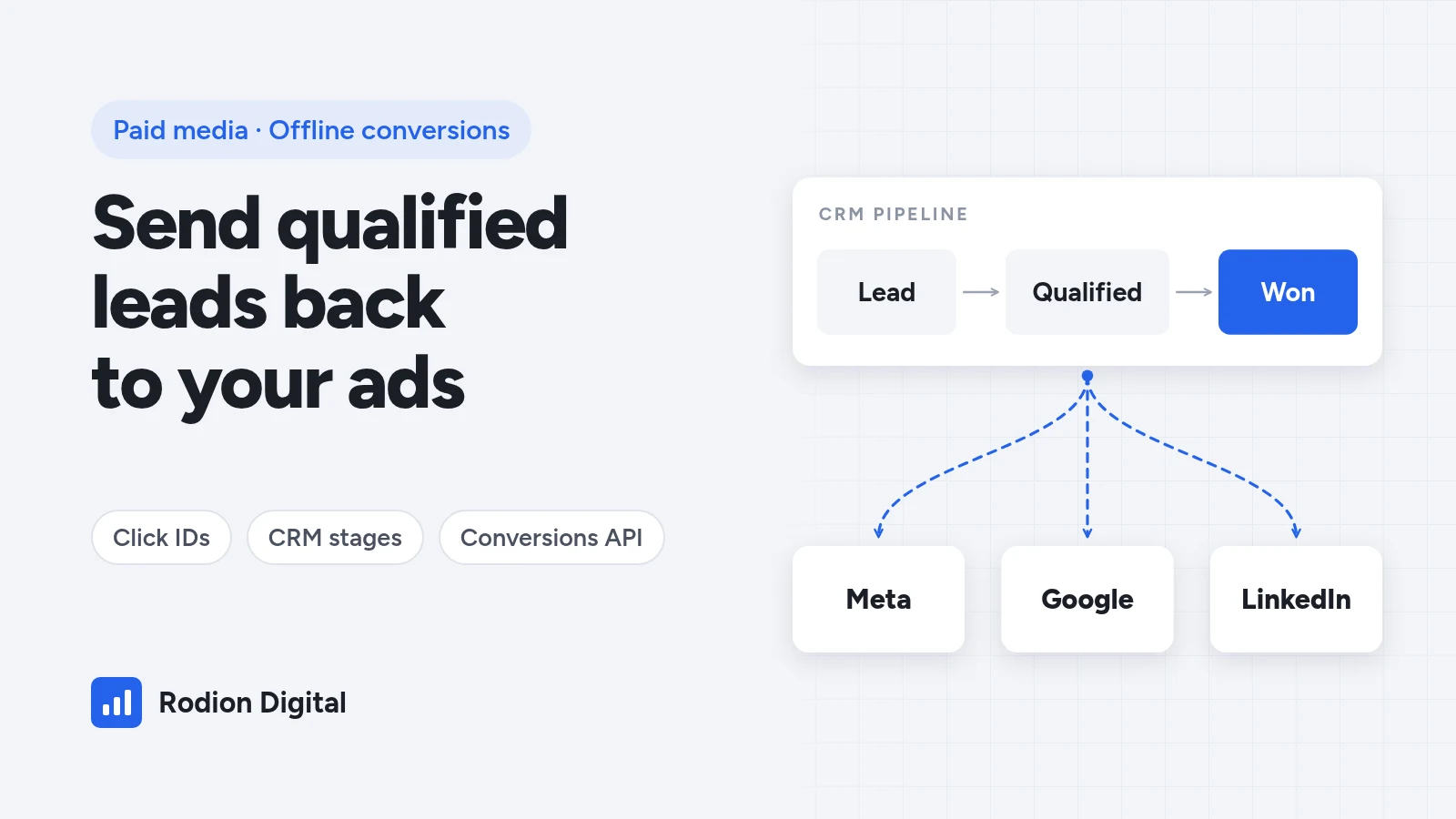
Ad platforms optimize for whatever you tell them a conversion is. If that's a form submission, they'll find you people who submit forms — including students, competitors, job seekers and bots. The fix isn't a better audience or a new creative. It's telling Meta, Google and LinkedIn which leads actually turned into qualified opportunities and customers, using the data already sitting in your CRM. This guide covers what to send, how each platform takes it, and the order to set it up in. It pairs with the lead gen unit economics guide, which shows how to set the target cost per qualified lead you'll optimize toward.
Cheap leads are usually a signal problem, not a targeting problem. The platform is doing exactly what you asked.
Why form fills are a weak optimization signal
A form fill is the easiest event to track and the most common one to optimize for, which is why it's so often the wrong one. It tells the algorithm nothing about who went on to qualify, take a meeting or sign. Two leads that look identical at the form stage can be worth zero and €10,000.
When you send later CRM stages back — qualified, meeting held, won — three things change. The platform learns which users resemble your real buyers. Reporting shows cost per qualified lead and cost per customer by campaign, not just CPL. And you can finally cut campaigns that generate cheap, unqualified volume.
Step 1: define the stages you'll send
Before touching any integration, agree on a short list of stages that your sales team actually updates in the CRM. For most lead gen businesses that's three or four:
- Lead — the form submission or call.
- Qualified lead — meets your criteria (budget, fit, decision-maker). This is usually the best stage to optimize toward: frequent enough for the algorithm to learn from, close enough to revenue to matter.
- Meeting or opportunity — a sales conversation happened or a proposal was sent.
- Customer — deal won, ideally with the deal value attached.
Two rules make or break this. Stages must be updated when they happen, not cleaned up in bulk at the end of the month, because timing is part of the signal. And the definitions must be stable — if "qualified" means something different every quarter, the algorithm learns noise.
Step 2: capture the identifiers that make matching work
Platforms can only credit a CRM stage to an ad if they can match the lead back to a click or a user. The most common reason offline conversions fail is that these identifiers never reach the CRM. Capture them on every form, in hidden fields, and store them on the contact or deal record:
- Click IDs — GCLID (Google), fbclid / the _fbc cookie (Meta) and li_fat_id (LinkedIn), read from the landing page URL or cookies.
- Contact details — email and phone number, which the platforms match in hashed form. Normalise them first (trimmed, lower-case email, phone with country code), because small formatting differences break matches.
- Timestamps and value — when each stage was reached and, for won deals, the deal value and currency.
Leads from native platform forms — Meta Instant Forms, LinkedIn Lead Gen Forms — never touch your website, so there's no click ID to capture. They're matched through the platform's own lead ID or the contact details instead. If your tracking setup doesn't capture any of this today, that's the first job; it's the core of a proper tracking and analytics setup.
One note for European businesses: hashing doesn't make data anonymous. Sending customer data to ad platforms needs a lawful basis and should be covered by your consent setup and privacy policy — check it with whoever owns privacy before you switch anything on.
Meta: Conversions API for CRM
Meta takes CRM data through the Conversions API. The older Offline Conversions API was discontinued in 2025, so any setup still built on it needs moving. How it works depends on where your leads come from:
- Instant Forms (Meta lead ads). Connect your CRM in Events Manager (Data sources → CRM) and send each stage change with the Meta lead ID. This unlocks the Conversion Leads performance goal, where Meta optimizes toward the stage you choose rather than raw leads. Meta sets entry requirements — such as a minimum monthly lead volume, at least daily uploads and a stage that a meaningful share of leads reaches within a few weeks — so check them in Events Manager before you plan around it.
- Website forms. Send the stage as a Conversions API event with hashed email and phone plus the _fbc / _fbp values captured at the form, then optimize website conversion campaigns for that event.
Send every stage, not just the sale: the stage history is what teaches the model. Meta recommends at least two stages, and the event has to arrive soon after the stage changes — uploading once a day is the safe habit. HubSpot can send stages to Meta natively; other CRMs usually connect through a partner integration or an automation tool.
Google Ads: enhanced conversions for leads
Google's recommended route is enhanced conversions for leads. The Google tag captures hashed contact details when the form is submitted, and you later upload the CRM stage for the same lead. Google matches the two and credits the original ad click. The GCLID still helps — keep capturing it and send it where you have it — but you're no longer dependent on it alone.
- Create one conversion action per stage (qualified lead, customer) and set the primary one — the one bidding optimizes toward — to the stage that best reflects quality without being too rare.
- Use a native connector where you can. HubSpot and Salesforce both connect to Google Ads; Google's Data Manager is now the central place to set up these connections and uploads.
- Check older custom integrations. If a developer built an API upload a while ago, make sure it still uses a supported method — Google has been moving these uploads to newer APIs.
- Add values to won deals so value-based bidding can prioritize bigger deals later.
LinkedIn: Conversions API and CRM sync
LinkedIn's Insight Tag tracks on-site actions, but B2B deals close weeks or months after the click, long after the browser session is gone. LinkedIn's Conversions API fills that gap by accepting CRM events server-side.
- Turn on enhanced conversion tracking so the li_fat_id click ID is added to your landing page URLs, and capture it in a hidden form field.
- Send qualified and won stages with the li_fat_id and hashed email, through a CRM integration or an automation tool. Lead Gen Form leads are matched on email.
- Use long click attribution windows for conversions that happen late in the cycle, and keep view-through credit modest.
LinkedIn is where this matters most, because clicks are expensive and the gap between a form fill and a real opportunity is widest. Optimizing LinkedIn campaigns on qualified leads instead of form fills is usually the single biggest lever in a B2B account.
A practical rollout order
- Week 1: agree stage definitions with sales, add hidden fields for click IDs, and confirm they land on CRM records.
- Week 2: connect the platform with the most spend first and send stages daily. Don't change campaign optimization yet.
- Weeks 3–4: check match rates and that stage counts in the ad platform line up with the CRM. Fix gaps before going further.
- Then: test optimizing toward the qualified stage on one campaign against your current setup, judged on cost per qualified lead and cost per customer — not CPL. Roll out what wins, then repeat for the next platform.
Expect CPL to go up when you switch. That's the point: you're buying fewer, better leads. The numbers that should improve are further down the funnel — the ones that determine what you can afford to spend on paid media.
Common mistakes
- Sending only won deals. Too few and too late to learn from. Send the qualified stage too.
- Bulk-updating stages. Monthly clean-ups give every lead the same timestamp and confuse attribution. Update stages as they happen.
- Click IDs captured on some forms only. One landing page without hidden fields quietly removes a whole campaign from your data.
- Switching optimization on day one. Let data build up and verify it before the algorithm depends on it.
- Ignoring consent. Make sure the data you send is covered by your consent setup and privacy policy.
FAQ
What are offline conversions?
Conversions that happen outside the ad platform's tracking, usually in your CRM: a lead becoming qualified, a meeting being held or a deal being won. Sending them back lets the platform credit the ad that started it and optimize toward similar people.
Which stage should I optimize for?
Usually the qualified lead stage. It's frequent enough for the algorithm to learn from and much closer to revenue than a form fill. Won deals are often too rare and too late to optimize on directly, but you should still send them for reporting and value-based bidding.
Do I need a developer to set this up?
Not always. HubSpot and Salesforce have native connections to the main ad platforms, and automation tools cover many other CRMs. You do need someone to add hidden fields for click IDs and to map CRM stages correctly — that's where most setups go wrong.
Will my cost per lead go up?
Often, yes. When campaigns optimize for qualified leads instead of form fills, they buy fewer low-quality leads, so CPL can rise while cost per qualified lead and cost per customer fall. Judge the switch on those numbers.
Is sending CRM data to Meta, Google and LinkedIn GDPR-compliant?
It can be, but hashing alone doesn't make data anonymous. You need a lawful basis, a consent setup that covers it and a privacy policy that mentions it. Check with whoever is responsible for privacy in your business before you switch it on.
Related reading: Meta Lead Ads Without Junk Leads · Lead Gen Unit Economics · Tracking & Analytics · Paid Media · Meta Ads for Shopify: Setup Guide.
Free growth audit
Want your CRM connected to your ad accounts?
I set up click-ID capture, CRM stages and offline conversion feeds for Meta, Google and LinkedIn — and switch campaigns to optimize on qualified leads once the data is flowing.
Step 1 of 3 · Your business

Written by
Rodion Riabyi
Growth partner for e-commerce, lead gen and B2B companies. €50M+ in ad spend managed across 250+ projects on Meta, Google, TikTok and LinkedIn.